
Individual AI endpoints are great when you only need one capability—such as reading a license plate or blurring faces.
In real insurance claims, fleet returns, and marketplace intake, however, a single submission rarely needs just one model. A typical claim arrives as a mixed bundle of exterior photos and PDF/photo documents, and your backend ends up orchestrating six steps in sequence:
- Sort photos from documents
- Detect and redact PII (faces, license plates, personal data on documents)
- Check vehicle angle / side
- Run damage recognition
- Run OCR on claim documents and extract identifiers
- Merge every output into one normalized payload
Building and maintaining that orchestration layer—passing intermediate buffers, handling partial failures, and unifying schemas across services—quickly becomes more work than the integration itself.
One Declarative Pipeline Endpoint
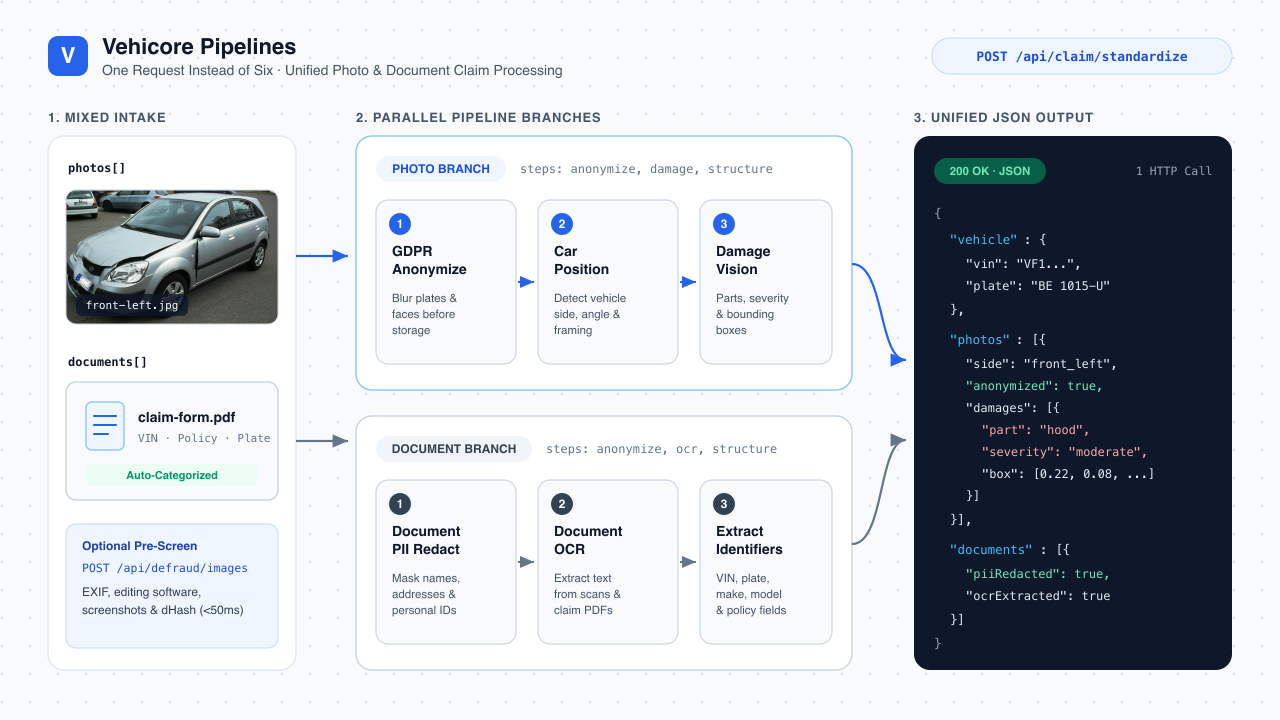
With Vehicore Pipelines (POST /api/claim/standardize or vehicore.claim.standardize()), you upload photos and documents in one multipart request and receive one structured JSON payload:
[ Mixed Intake: photos[] + documents[] + metadata ]
                      │
                      ▼
          [ Automatic Categorization ]
             ├──► Photo Branch:
             │      • PII detection & GDPR anonymization
             │      • Car Position (angle / framing)
             │      • Damage Recognition (severity + bounding boxes)
             │
             └──► Document Branch:
                    • Document PII redaction
                    • Document OCR
                    • Identifier extraction (VIN, plate, policy fields)
                      │
                      ▼
       [ Single Structured JSON Response ]
You can also pre-screen claim photos with Defraud Images (POST /api/defraud/images) before triggering the pipeline, and control which pipeline stages run via the steps query parameter (anonymize,ocr,damage,structure).
Calling POST /api/claim/standardize
curl -X POST "https://api.vehicore.pro/api/claim/standardize?steps=anonymize,ocr,damage,structure" \
  -H "X-API-Key: YOUR_API_KEY" \
  -F "[email protected]" \
  -F "[email protected]" \
  -F "[email protected]"
Or using @vehicore/sdk in TypeScript:
import { readFileSync } from 'node:fs'
import { Vehicore } from '@vehicore/sdk'

const vehicore = new Vehicore({
  apiKey: process.env.VEHICORE_API_KEY!,
})

const standardized = await vehicore.claim.standardize({
  photos: [readFileSync('./front-left.jpg'), readFileSync('./rear-bumper.jpg')],
  documents: [readFileSync('./claim-form.pdf')],
  steps: ['anonymize', 'ocr', 'damage', 'structure'],
})
When to Use Single Endpoints vs. Pipelines
- Use standalone endpoints when you only need one step (e.g.
POST /api/ocr/plateorPOST /api/defraud/images) or already run your own workflow orchestrator. - Use a pipeline when multiple steps depend on each other in order, when you want one HTTP round-trip with one combined JSON schema, or when you need clear step-by-step auditability.
Explore the interactive workflow on the Vehicore Pipelines page or build a custom chain in the Pipeline Builder.
Ready to integrate Vehicore APIs?
Start testing our Damage Recognition, Catalog Renders, OCR, and Anonymization endpoints with free tier credits, or contact our team for partner volume pricing.
Engineering & API Release Notes
Get notified when we ship new automotive vision models, SDK updates, and architecture guides. No spam.